TOOLKIT PRO · VERSION 3.2 · MICROSOFT EXCEL

Construction Estimating & Job Costing Toolkit PRO

Build a quote you can review. Track what the accepted job actually costs. Keep estimating and job control in two focused Excel workbooks.

Two workbooks. Two clear jobs.

01 · BEFORE THE JOB

Estimate & Quote Builder

Save a separate file for each estimate. Work from project setup and scope through takeoff, materials, labour, subcontract quotes, equipment and other costs, company recovery, markup or margin and bid review.

Readiness checks highlight unresolved issues before you release a Classic, Modern or Compact customer proposal. The Estimate Overview chart helps you see the cost build-up.

27 sheets, including a values-only Job Handoff for accepted work.

02 · AFTER ACCEPTANCE

Job Cost & Profit Control

Keep one working master for the business. Register accepted jobs, record expenses and labour, track subcontract commitments and approved changes, and review invoices and cash received.

Enter remaining costs to see a forecast final result. Review budget against actual and forecast costs, contribution after company recovery, portfolio status and lessons for future estimates.

14 sheets, with a Dashboard, Job Review and Portfolio. Three editable Excel dashboard charts make comparisons easier to see.

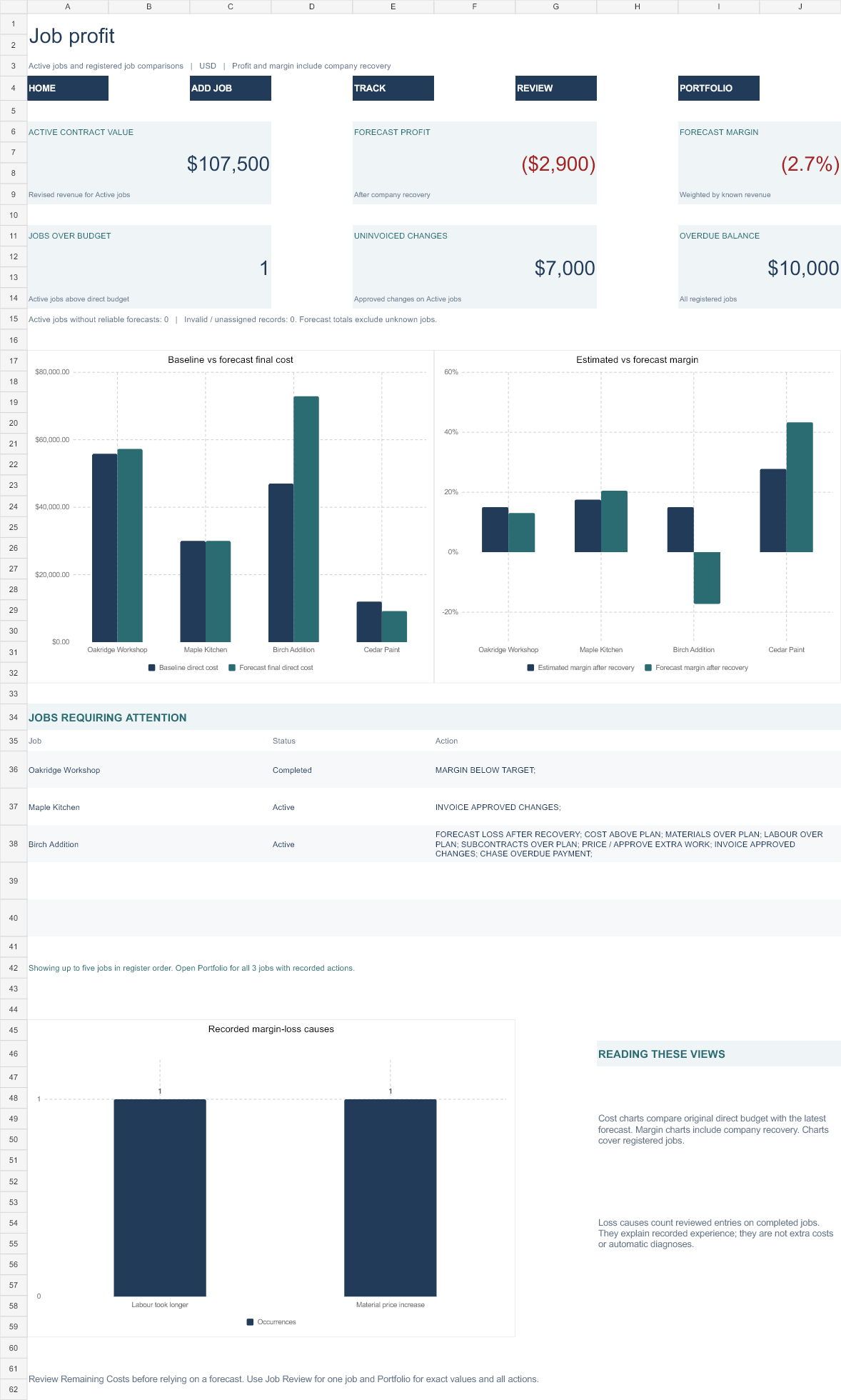
See the job-control dashboard

The completed fictional Oakridge example shows the dashboard populated. Your own results depend on the costs, approved changes and remaining-cost review you enter.

Populated Job Cost and Profit Control dashboard in the fictional Oakridge example

The complete US$19.99 package

Two clean core workbooks

Estimate & Quote Builder and Job Cost & Profit Control, ready for your own inputs. Formula cells are protected against routine accidental overwrite.

Two separate worked demos

Estimate Demo and Job Cost Demo show the fictional Oakridge workflow in each tool. Start your own work from the clean files.

Five bonus workbooks

Quick Estimate, True Labour Cost, Overhead Recovery, Markup & Margin, and Change Order Pricing.

Three proposal layouts

Classic, Modern and Compact layouts use the reviewed estimate, keeping internal labour, overhead and margin calculations out of client-facing output.

Editable and printable forms

Project information, supplier and subcontractor quote requests, post-job review, and printable scope, takeoff, pre-estimate, bid-review and job-cost sheets.

Guides and worked examples

Start Here, first-10-minutes and first-estimate workflows, the full user guide, worked bid examples, proposal examples, licence and version information.

From an accepted quote to job control

  1. Build and review the estimate. Save a job-specific copy of Estimate & Quote Builder and resolve the readiness checks before issuing the proposal.
  2. Capture the accepted baseline. Complete Job Handoff after acceptance. Copy its row as values into Add New Job in your business Job Cost & Profit Control master, then register the prepared row as values.
  3. Record the work. Enter job expenses, labour, subcontract records, approved changes, invoices and cash received.
  4. Review the expected finish. Review remaining costs and company recovery, update the review date and check Dashboard, Job Review and Portfolio.

The files have no external workbook links or macros. The handoff is a deliberate copy-and-paste-values step; later estimate changes do not silently alter the registered baseline.

Capacity and compatibility

The supplied job-costing master holds up to 30 registered jobs. Main transaction logs have 300 entry rows each; subcontract and learning logs have 150 rows each. Keep backups and monitor capacity as your records grow.

Use modern Microsoft Excel desktop. Google Sheets and Excel Online are not claimed as supported. Use Excel's normal print or Save PDF controls for client proposals.

What the figures tell you

Gross profit is revenue less direct job costs. Contribution after company recovery also deducts the company overhead allocation you enter. Forecast profit includes expected remaining costs. Profit and cash received answer different questions.

The toolkit supports estimating and job reviews. It does not replace accounting software, prescribe your rates or commercial targets, or guarantee profit or estimate accuracy.

Try the free tool first

Construction Job Profit Calculator

Check one job's revenue, costs, gross profit, contribution, margin and markup. Compare estimated against actual or forecast figures in the browser.

Calculate one job free

Understand construction job costing

Learn how an accepted estimate, actual costs and a remaining-cost forecast fit together before choosing a workbook.

Read the job-costing guide →

Before you buy

Is this a subscription?

No. The complete v3.2 package is a one-time purchase for US$19.99 plus applicable tax.

Do I get both core workbooks?

Yes. Both clean core workbooks, both worked demos, five bonuses, forms and documentation are included.

Does the dashboard update automatically?

The workbook calculates from your recorded inputs. Enter actual costs and approved changes, review remaining costs and company recovery, and update the review date so the forecast reflects your latest review.

Can I import transactions from accounting software?

No automatic accounting integration is included. Enter records into the provided logs and follow the guide's values-only handoff.

How do I receive the files?

Successful Stripe checkout redirects you to a secure download page. Save the ZIP and extract it before opening the workbooks. There is no physical product.

What if I need help or have a refund question?

See digital delivery, compatibility and refund information. Contact Mercer Lane Press using the email address used at checkout if you cannot access a paid download.
Build estimates. Control accepted jobs.

Get the complete Construction Estimating & Job Costing Toolkit PRO v3.2 for US$19.99, plus applicable tax.

Get the complete toolkit — US$19.99