MERCER LANE PRESS · EXCEL SYSTEM · v1.1

Landscape Contractor Estimating & Job Costing System

Estimate the job, create the quote, track the actual costs and see what the job really made.

£2.99 Introductory price · one-time digital purchase

Buy the system on Etsy

A connected landscaping estimate spreadsheet for contractors, owner-operators and small garden construction teams.

See inside the workbook ↓

Microsoft Excel desktop required and supplied separately. Etsy handles checkout and download delivery, including applicable taxes and local-currency conversion. Digital download; no physical item.

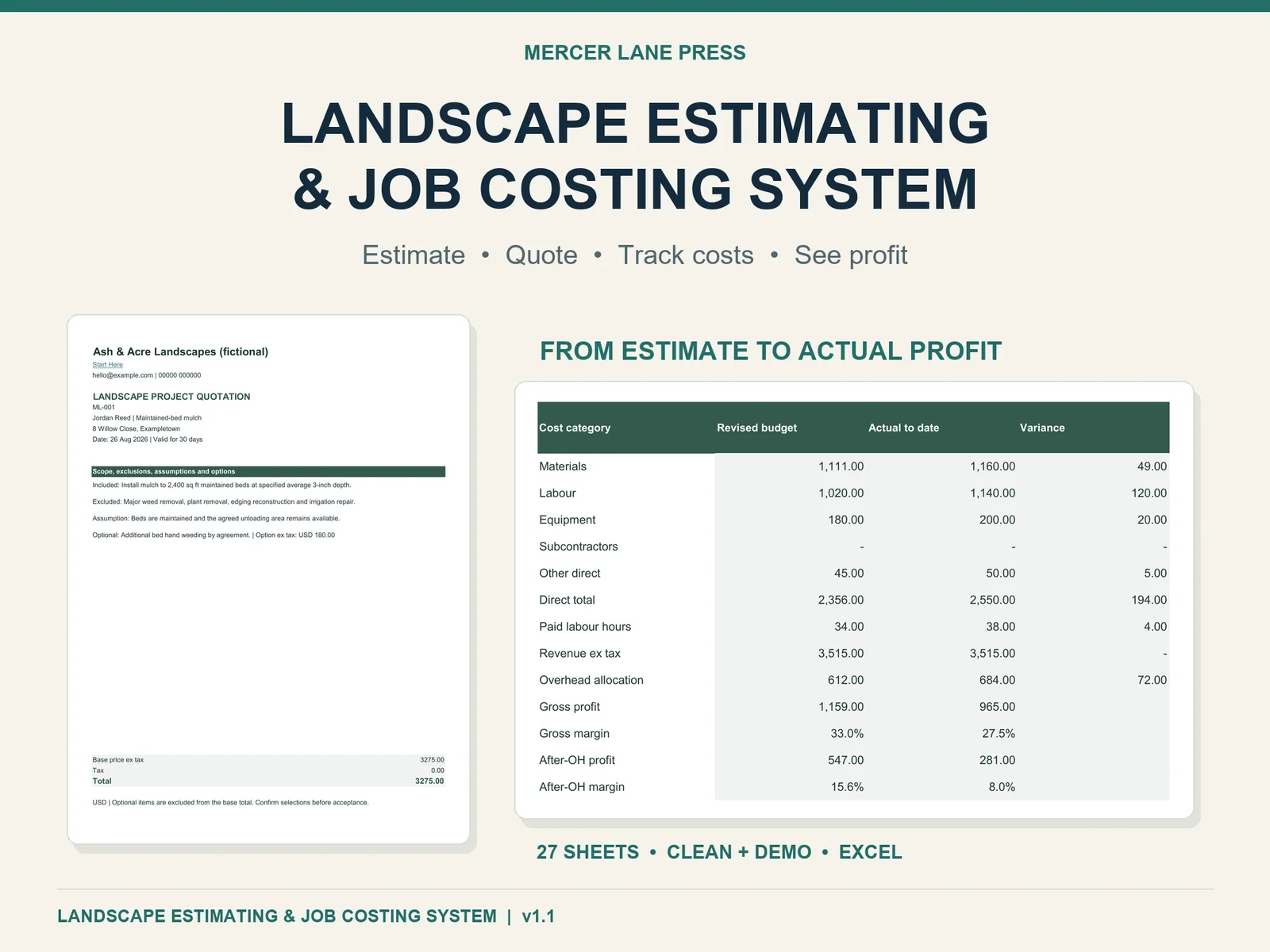
Landscape estimating and job costing Excel system with actual fictional Demo customer quote and job results
27 sheets. Clean and Demo workbooks. Three PDF guides and a README.

CHOOSE WHAT YOU NEED

A free bid check or a complete working Excel system?

Both use the same six-pass estimating approach. Choose the smallest tool that solves the task in front of you.

FREE · ONE QUOTE REVIEW

Check a bid before sending it

Use the printable six-pass Landscape Bid Readiness Checklist to review scope, quantities, labour, equipment, overhead and pricing. It checks readiness; it does not calculate a price or maintain job records.

Open the free bid checklist

PAID · COMPLETE JOB WORKFLOW

Estimate, quote and review actual job profit

Use the 27-sheet Excel desktop system to prepare an estimate, export a customer quote, freeze an awarded budget, log costs and approved variations, and review final profit after closeout.

£2.99 · one-time digital purchase · no subscription. See actual workbook screens.

Buy the Excel system on Etsy

Excel desktop required separately; tested on Windows Excel desktop 16.0. Book sold separately.

Make the cost base visible before you quote

Labour, purchase quantities, equipment, delivery and disposal can disappear inside a price guessed from experience. Build them deliberately, recover overhead once and keep markup distinct from margin. Then preserve the awarded estimate so the final review tells you where the job differed.

The arithmetic uses your own inputs. The system does not supply universal landscape rates or guarantee that a bid or job will be profitable.

From estimate to actual profit

Estimate the work

Define scope, convert quantities, estimate productive and paid labour, and include the complete direct cost base.

Review and quote

Apply one overhead method and markup or margin. Resolve readiness checks, review the bid and export the customer quote.

Freeze and track

Copy the awarded handoff as values to preserve the sold budget. Record incurred costs and approved variations by Job ID.

Close and learn

Confirm final costs, revenue and overhead. Compare estimate versus actual, then review comparable production evidence.

Scope → Quantity takeoff → Materials → Labour → Equipment → Other costs → Overhead → Markup or margin → Bid review → Client quote → Won job → Actual costs → Variations → Actual profit → Production learning.

Built for landscape contractors

Crew labour and equipment

Use direct hours or your company production rates. Keep productive and paid person-hours distinct. Cost owned equipment or rentals with minimum hire, delivery, collection and other fees.

Understand landscape labour-hours

Overhead and pricing

Include subcontractors, disposal, other direct costs and deliberate risk allowances. Choose one of five overhead methods and apply markup or target margin to the defined cost base.

Understand markup versus margin

See the actual workbook

Real product views from the supplied fictional Demo. Prices, rates, customers and outcomes are teaching examples in USD, not benchmarks or recommended prices.

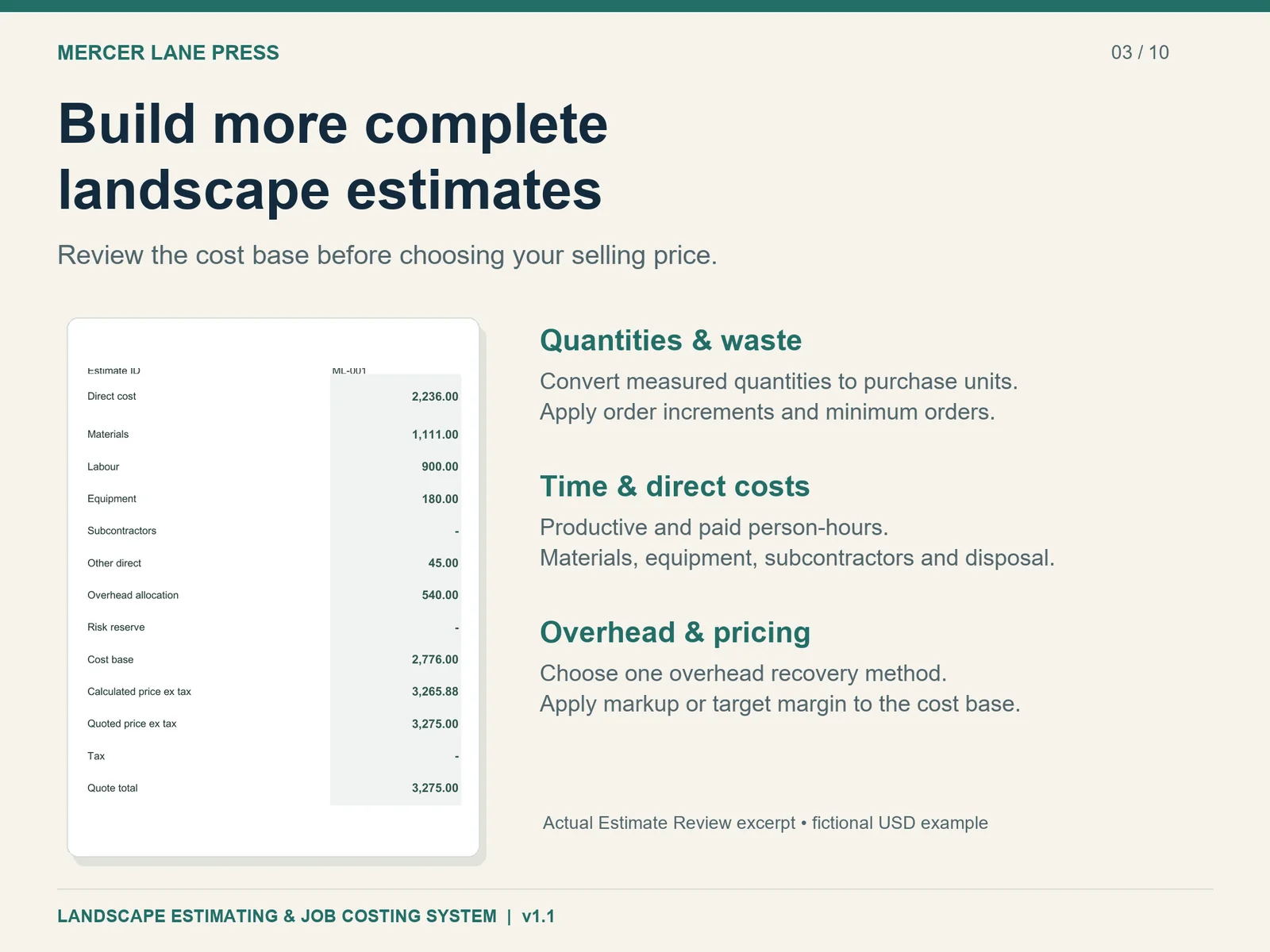
Actual Estimate Review from the fictional USD demo, with direct costs, overhead, quoted price and margins
Build and review the cost base before pricing.
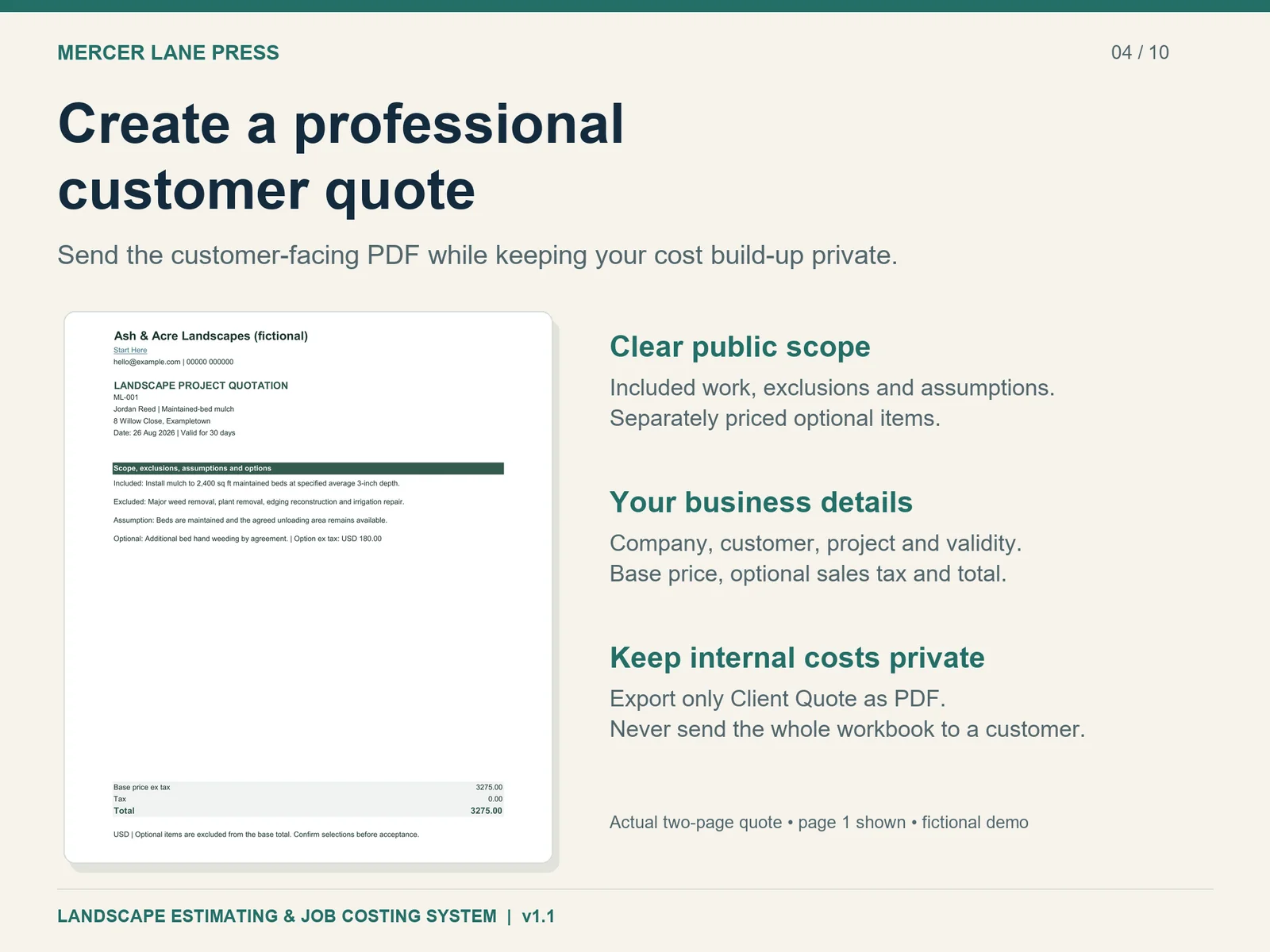
Actual customer-facing landscape quotation, including scope, exclusions, a priced option and total
Export Client Quote only; internal costs and profit stay private.
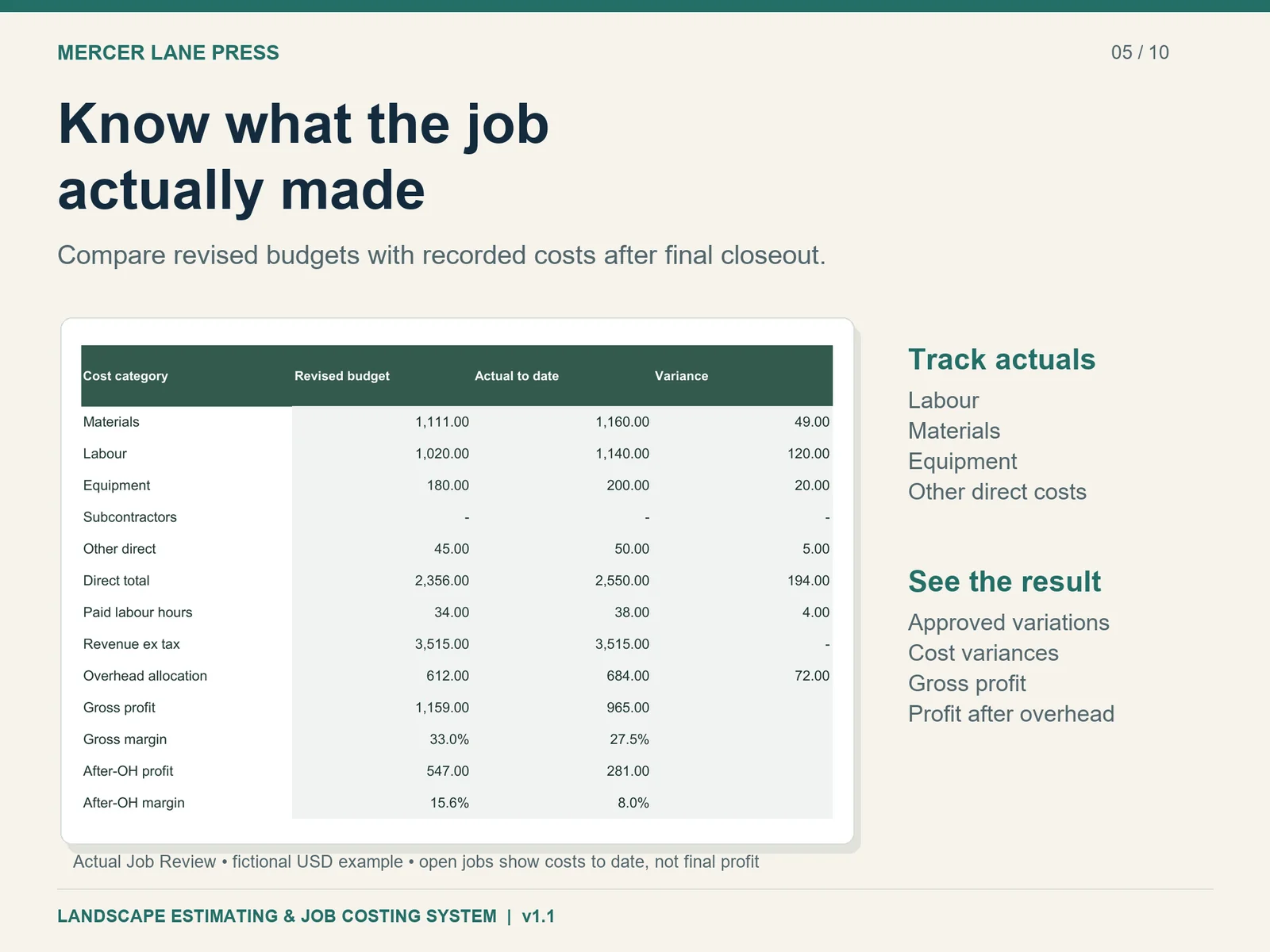
Actual Job Review comparing revised category budgets with fictional incurred costs and final job profit
See cost variances, gross profit and profit after overhead.
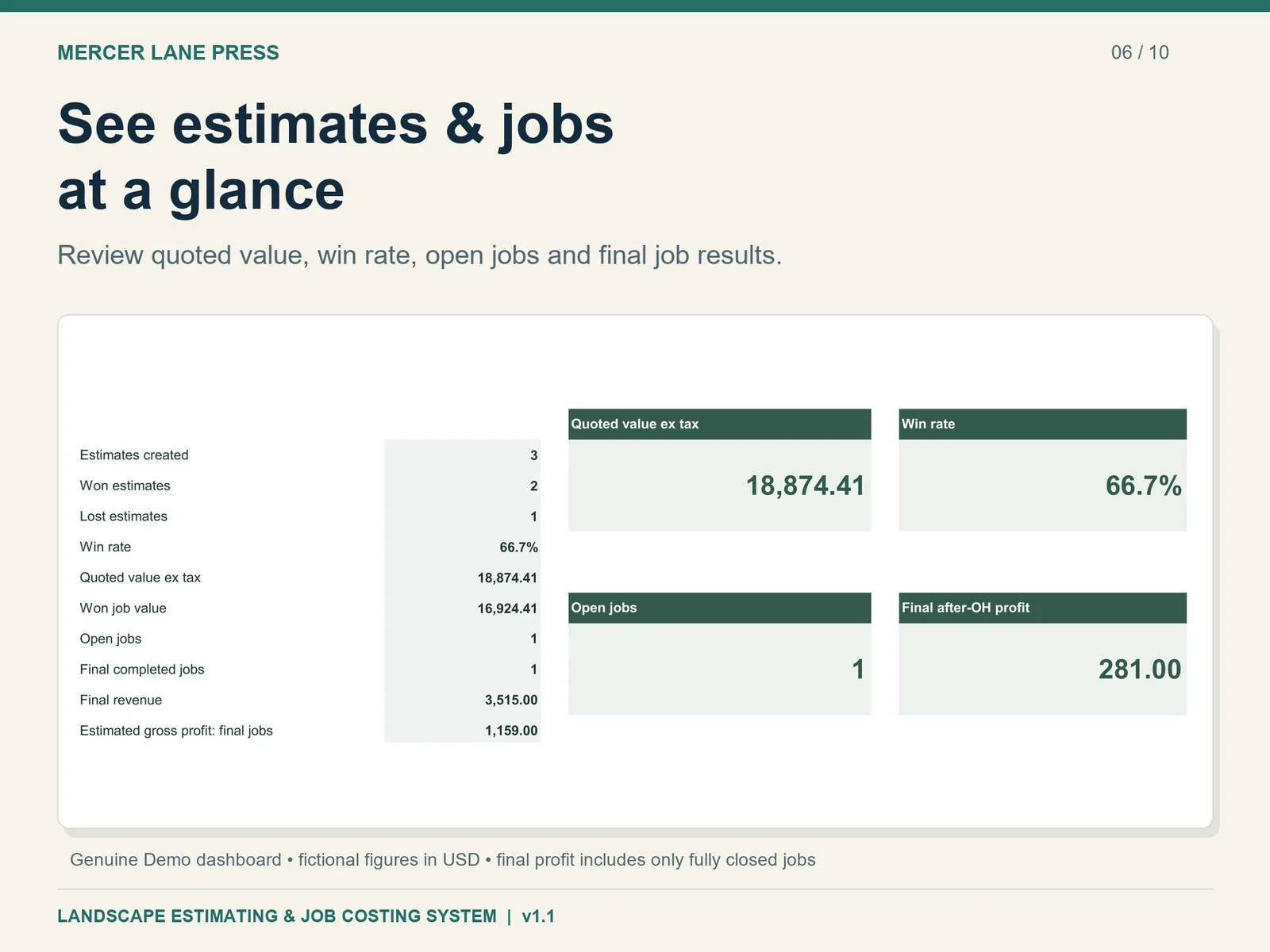
Genuine fictional Demo dashboard excerpt with quoted value, win rate, open jobs and final after-overhead profit
Final financial results include only fully closed jobs.

Professional client quotes

Client Quote presents your business, customer, project, public scope, exclusions, assumptions, separately priced options, validity, base price and optional single-rate sales tax. Up to 16 public scope statements fit the prepared two-page output.

Resolve the readiness checks and bid review, then export only Client Quote as PDF. Internal costs, overhead, profit and risk notes stay out of that output. Review both printed pages before issuing each quotation; keep the whole workbook private.

Estimate versus actual: keep the learning loop intact

The awarded handoff is copied manually as values into the job register to freeze its baseline. Record incurred actual costs and approved variations once. Job Review compares revised budgets with actual materials, paid labour, equipment and other costs.

Final gross profit and profit after overhead appear only after genuine final closeout. Open-job costs are spending to date, not a forecast to finish. Log comparable completed production observations and review weighted actual rates before deliberately changing expected company rates.

Read the landscape estimate-versus-actual guide →

What's included

One ZIP containing exactly six customer files:

  • Clean Excel system: 27 sheets, prepared for your own business records.
  • Populated Demo workbook: fictional estimates, quotes, jobs and learning examples.
  • Quick Start Guide PDF: 3 pages, from first estimate to tracking and learning.
  • Full User Guide PDF: 23 pages of methods, reference and troubleshooting.
  • FAQ PDF: 5 pages covering common questions.
  • README: setup, capacity and safe-use notes.

Start with a business working copy

  1. Purchase on Etsy, download the ZIP and extract all six files.
  2. Read the Quick Start and explore the Demo separately.
  3. Save a working copy of the clean workbook; enter your company details and current costs.
  4. Follow Start Here from scope through pricing, review, quotation and job closeout.

What you need

Microsoft Excel desktop. Windows Excel desktop 16.0 is the tested environment; Mac, older Excel, Excel Web, Google Sheets and other apps are not individually certified. Use one responsible editor at a time and one currency per file.

Prepared capacity: 50 estimates and 50 jobs; 300 transaction rows per table; 100 library rows. Use prepared rows, keep dated backups and archive complete files. Adding a table row alone does not extend calculation ranges.

Amber cells accept inputs; grey calculations are protected. Unprotect without a password only for deliberate maintenance, then re-protect and check. Protection helps prevent accidental edits and is not encryption.

Enter your own current costs, production evidence, overhead assumptions, contract wording and local tax treatment. This is a management estimating tool, not an accounting, invoicing, payroll, design or tax-return application. It has no automatic supplier pricing, cloud collaboration or accounting integrations. Developed with AI assistance and reviewed by Mercer Lane Press.

Prefer the full estimating method and worked examples?

Landscape Contractor Estimating & Pricing by Warren Holtby explains the six-pass method and sixteen complete worked estimates. The digital system gives you the working Excel files to put the process into practice.

The book is sold separately and is not included in this download.

Explore the companion book

Browse the free landscape estimating guides

Frequently asked questions

Is this only a landscaping estimate template?

It connects estimating and customer quotation with a frozen awarded budget, actual costs, approved changes, final profit and production learning. It is a working Excel system with manual entry and review steps.

Can I use my own costs and currency?

Yes. Replace library inputs with your own current supplier, labour, equipment and production evidence. Use one currency per file. Changing the currency label does not convert amounts.

How many estimates and jobs can I keep?

Prepared capacity is 50 estimates and 50 jobs, 300 transaction rows per table and 100 library rows. Archive a complete dated file and start a fresh working file from the clean original when needed. Adding an Excel table row alone does not extend the prepared calculations.

Does it create invoices or track payments?

No. Client Quote is a quotation/proposal. The system records incurred job costs and management profit; use your existing invoicing, payroll and accounting processes.

Why is final profit blank on an open job?

Open jobs show costs to date. Final profit requires completed status, confirmed final costs and revenue, explicit reviewed base revenue and overhead, clean cost logs, and all variations resolved as Approved or Rejected.

Will it work in Google Sheets or Excel for Mac?

Windows Excel desktop 16.0 is the tested environment. Mac Excel, older Excel, Excel Web, Google Sheets and other spreadsheet apps have not been individually certified. Validation, protection and printing can vary. Use Excel desktop.

Is there a subscription?

There is no product subscription. This is a one-time digital purchase; Microsoft Excel is required and supplied separately. The core workbook needs no macros, add-ins, external workbook links or internet connection.

How do I receive the files and get help?

Buy through Etsy and download one ZIP containing the six customer files. Extract it on your computer and read the Quick Start Guide. For product help, contact MercerLanePress through your Etsy order with the version and a non-sensitive description.

Get the Landscape Estimating System

Keep estimate, quote, actual costs and final profit in one working process.

Get the digital system on Etsy — £2.99

One-time digital purchase. Excel supplied separately. Etsy displays applicable tax and any currency conversion.